
This example will begin with the report data (Fig. 3.34). This is exactly the case when, without raw data, it is impossible to conduct a full consultation based only on the report.
Let us deal with Example 5.
Here the situation is rather confusing: high work efficiency with a low stress level, but the respondent is in the red zone; the functional-state graph begins with moderate fatigue, and the state with the highest tension occurs during the second rest, while the cognitive load was performed in the rest zone, which is difficult to expect during the performance of test tasks.
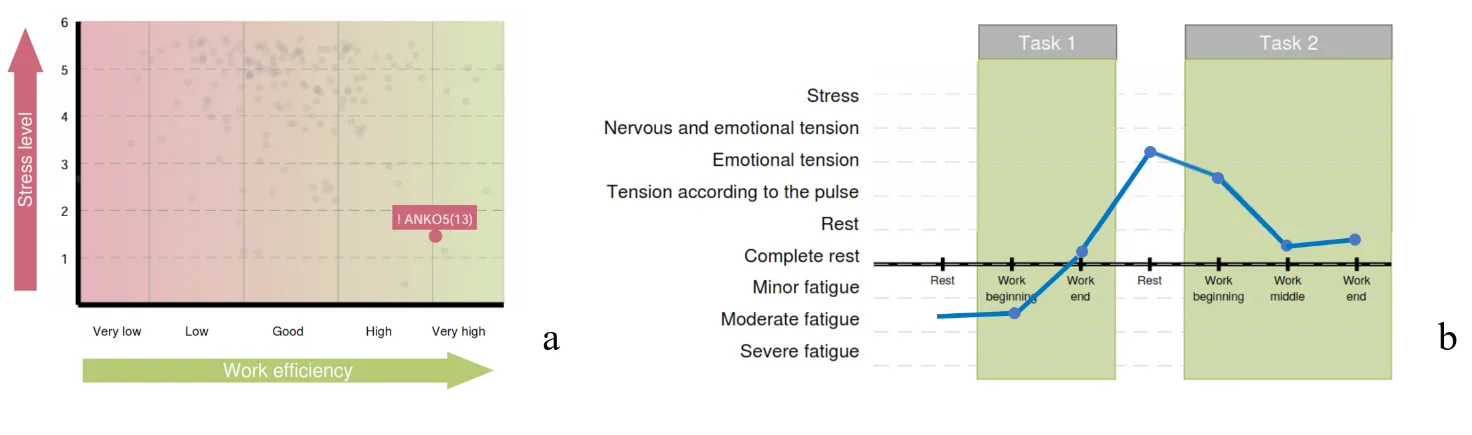
Figure 3.34. Diagrams of Chapter 3 of the report (Example 5): a – the functional type of performance support; b – the respondent’s functional states in the process of performing test tasks
Let us look at the “Cardio domain” page (Fig. 3.35). What draws attention: pronounced fairly stable bradycardia, with HR fluctuations from 54 (highlighted by a white line in the figure) to 75 beats/min (white arrow); a narrow CIG curve, which indicates low heart rate variability (this is confirmed by the data of Sector 3); red vertical lines (under the red vertical oval in the figure) in Sector 4, with which the CleverView system marks possible extrasystoles (we select this segment and make sure (Fig. 3.36) that some marks identified premature heart contractions correctly); age—59 years with signs of excess body weight—BMI = 27.4; spikes of rest periods are artifacts associated with defects of the ECG recording (yellow arrow).
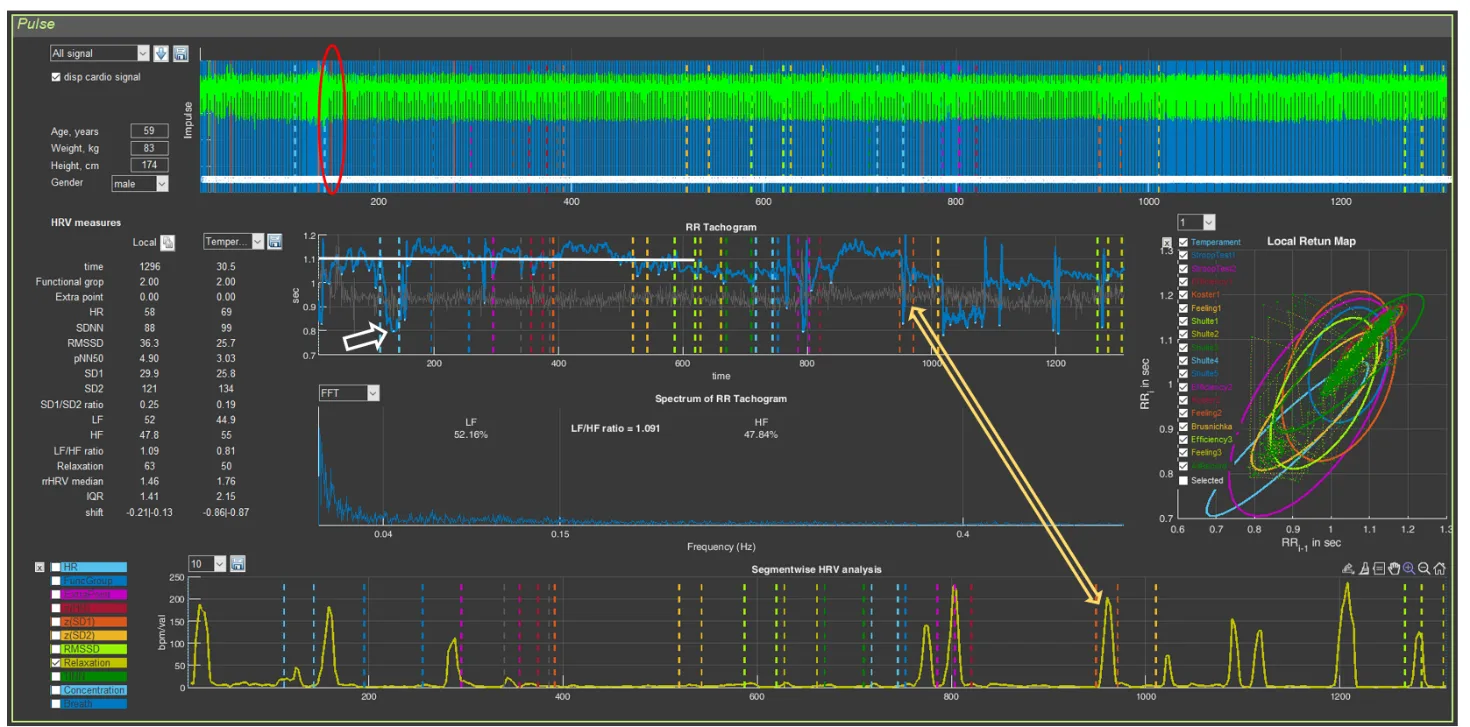
Figure 3.35. The respondent’s “Cardio domain” page (Example 5)

Figure 3.36. Premature heart contraction—extrasystole (Example 5)
Conclusion: signs of chronic stress with depletion of reserves (in contrast to Example 2) for maintaining an optimal state of the organism, with preserved high cognitive function. Considering the respondent’s age, their attention should be drawn to the need to monitor their health status and to turn to practices for maintaining mental and physical health in order to replenish reserves and reduce the pressure on the organism of the state of chronic stress.
Let us note that respondents with bradycardia, or with a heart rate that, on average over the testing time in Stressonika, does not exceed 70–75 beats/min, are the most difficult for consulting. Thus, in the case of Example 2, only with extensive experience and familiarity with reports and raw data is it possible to conduct a consultation without relying on HRV data. However, such a consultation will still be based on assumptions. To make the conclusions of the report more objective in such cases, it is necessary to analyze ECG and heart rhythm data on the “Cardio domain” page of the CleverView program.
*We have already touched upon the key points of such analysis. Let us repeat:
- consider the shape of the cardiointervalogram (CIG) curve (Sector 5), its dynamics (mobility/inertia), and its thickness at different stages;
- analyze HRV mobility at the controlled-breathing stages;
- assess the shape and organization of the scatter plots visually (Sector 7) and using statistical and mathematical processing methods (Sectors 3 and 6) at the stages where fatigue is detected, and during periods when the respondent was offered rest;
- review the ECG curve (Sector 4) for possible episodes of extrasystole.*
Only after this analytical work can an acceptable analysis of the report and reasoned recommendations be provided to the respondent.
Using Example 5, let us illustrate one more possible option for using Sector 8. In Fig. 3.37, this sector reflects the dynamics of the respondent’s functional state throughout the entire testing time. For some, this function may be more visually clear than the rest-level curve. For those who will use this curve, some clarifications and recommendations:
- the averaging value should be set to at least 50 (we remind: the window for selecting the averaging measure is under the white oval;
- the vertical-value scale is from 0 to 100;
- vertical scale values for the functional state indicator: 0 – “Complete rest”; 10 – “Rest”; 20 – “Pulse-based tension”; 30 – “Emotional tension”; 40 – “Nervous-emotional tension”; 50 – “Stress”; 60 – “Mild fatigue”; 70 – “Moderate fatigue”; 80 – “Pronounced fatigue”.

Figure 3.37. Dynamics of the functional state (Example 5)
The functional-state dynamics graph can be compared with Fig. 3.34b. It is obvious that the curve in Fig. 3.37 is more detailed.
P.S.
The study result and the conclusions made “impressed” the respondent and pushed them toward the need to “help” their organism. The approaches they chose in this direction yielded their results (Fig. 3.39).
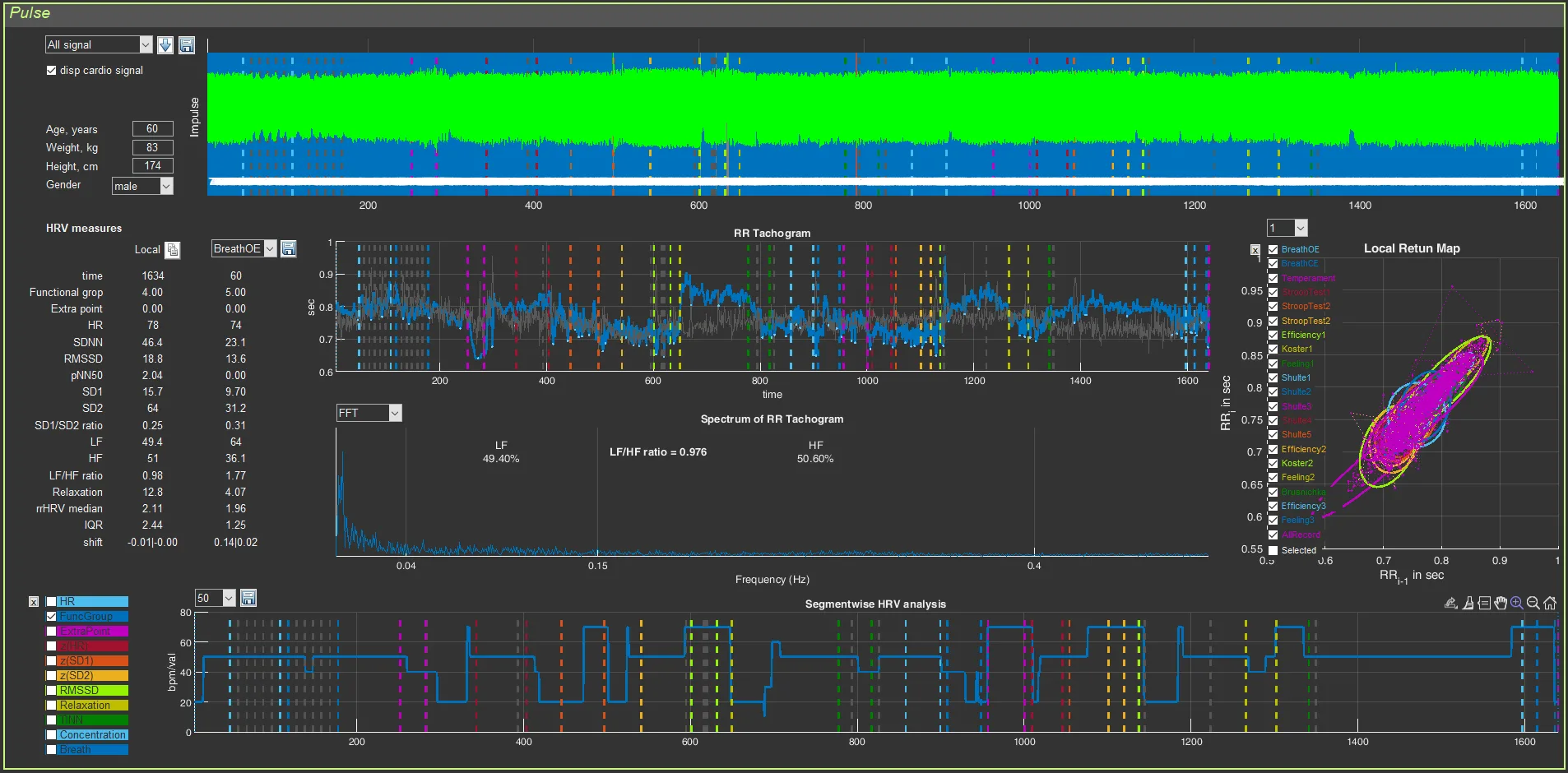
Figure 3.38. The respondent’s “Cardio domain” page after 7 months (Example 5)
Try to draw the conclusions that can be made from the presented figure in comparison with the initial state yourself.