
Sector 2 reflects the respondent’s anthropometric data.
Anthropometric data are sometimes useful during a consultation. With experience, you will learn to notice certain details in the respondent’s behavior during testing and their reaction to your dialogue, and then your conclusions or recommendations may also involve the data of this sector. Among the important ones, you can single out age, body weight (height is needed to calculate body mass index), and sex.
This sector does not require special explanations, except for one point (Fig. 2.7).
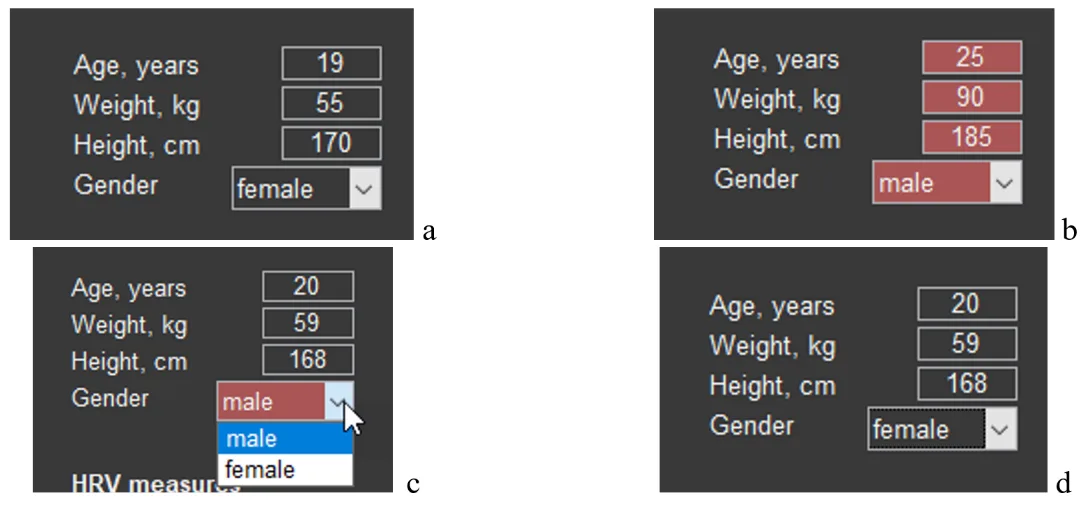
Figure 2.7. A sector on the screen with the respondent’s anthropometric data (explanations in the text).
Data on the number of full years, weight, height, and sex can be displayed in the main tone of the screen (Fig. 2.7a) or in red (Fig. 2.7b). Red is always a warning color: these data do not correspond to the respondent. Such cases can occur, for example, when you changed the names of the main files, accidentally deleted the file for storing these data in the “SAVED DATA” directory (remember our warnings?) or activated with CleverView a file from another location. The possibility of correctly assessing results related to HRV is possible only with reference to the data of sector 3. Therefore, if you need data for a particular person and the cells of the sector are colored red, enter them manually (age, weight and height) and, using the arrow (Fig. 2.7c), specify sex. The result obtained is shown in Figure 2.7d.
It remains to do a recalculation. Press the arrow of sector 1 (Fig. 2.4). Now the HRV data from sector 3 can be saved for further work with them.